

LANLison
Smokeless Ashtrays for Cigarettes Indoor,Smokeless Ash tray for…
BrandLANLisonFilterActivated Carbon
See today’s price on Amazon
View product details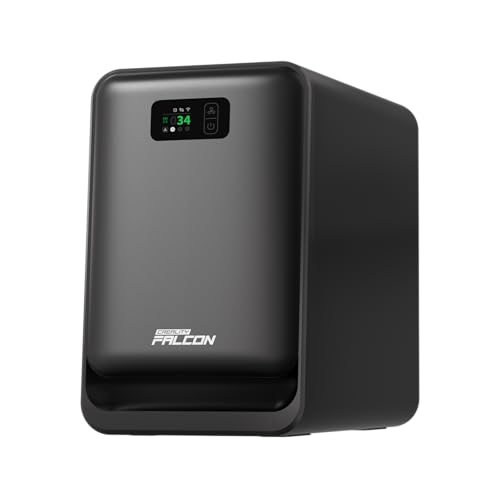
Smart Auto Sync with Laser Engraver——Built with WiFi connectivity, the Creality Falcon AP1 Desktop Smoke Purifier can automatically sync with your laser engraver. It starts and stops with your machine, providing hands-free operation and seamless workflow during engraving and cutting. Advanced 5-Stage Filtration——Equipped with a multi-layer filtration structure, this creality purifier effectively captures smoke, dust, PM2.5 particles, and odors generated during laser engraving.
As an Amazon Associate, AirPurifierFAQ earns from qualifying purchases. Product availability, price and specifications can change.
The Creality Falcon AP1 is a compact desktop smoke purifier marketed to sit alongside Falcon A1-series laser engravers. Supplied product data identifies key hardware and software features: Wi‑Fi connectivity with automatic start/stop synchronization to a connected laser engraver, a five‑stage filtration stack, a built‑in PM2.5 sensor with on‑device air quality readout and filter life reminder, a 360° intake design and a stated airflow of 250 m³/h. The listing positions the unit for small workshops and home engraving setups where smoke, dust and machining odors are the primary concern.
This purifier is presented specifically for desktop laser engraving environments, particularly Creality Falcon A1 series setups. Its compact footprint and Wi‑Fi auto‑sync feature are designed to match workflows where the purifier starts and stops with the engraver, removing the need for manual operation. That said, the product information does not include a CADR rating or a recommended room size, so suitability is determined more by proximity to the source of smoke than by an advertised coverage area. Use this unit as a local exhaust/air cleaner positioned close to a desktop engraver rather than as the sole cleaner for a larger workspace.
Creality lists a ‘5‑stage filtration’ system and says the purifier captures smoke, dust, PM2.5 particles and odors. The unit also carries a stated airflow of 250 m³/h and a 360° intake design with ‘strong suction’. Those facts indicate the device is built to pull contaminated air from around a work area into a multi‑layer filter train. The listing does not disclose filter media types or particle‑capture efficiencies, so you should not assume specific HEPA or activated‑carbon performance without confirmation. The 250 m³/h figure gives a rough sense of throughput, but without CADR or room‑size guidance, translate that into practical expectations by considering placement and proximity to the smoke source.
Wi‑Fi connectivity and the ability to auto‑sync with a laser engraver are the primary smart features listed. The product description explains the purifier can start and stop with the machine, which can simplify operation during batch jobs or frequent on/off cycles. There is also an onboard PM2.5 sensor that reports real‑time air quality and provides a filter life reminder. The listing does not specify the mobile app, supported platforms, or network requirements, so buyers should verify details such as the manufacturer app, firmware compatibility with their engraver, and whether local network policies (e.g., enterprise Wi‑Fi) affect connectivity.
The only maintenance‑related detail supplied is a filter life reminder triggered by the purifier. Replacement filters, replacement frequency, and their cost are not specified in the product data. Noise levels, power consumption and operational modes are likewise absent. In practice, expect regular filter replacements when using the purifier for smoke and odor removal; check Creality or retailers for genuine replacement parts. If shop noise or energy use matters in your environment, request those specifications from Creality before purchase. Also confirm whether any firmware updates or app maintenance are needed to keep the auto‑sync feature functioning reliably.
The 360° intake design suggests the unit draws air from all around its body, so place it with clearance on the sides and avoid blocking inlets. For laser smoke control, the purifier will be most effective when positioned close to the engraving area so captured emissions are drawn in before spreading. The product data does not describe exhaust orientation, ducting options or whether it is intended for sealed or ventilated enclosures; check those points if you plan to route exhaust outdoors or integrate the purifier with an enclosure's airflow. Maintain adequate clearance, follow any manufacturer installation guidelines, and ensure nearby combustible particles or flammable vapors are handled according to your laser system’s safety guidance.
This unit is likely best suited for users of Falcon A1‑series desktop engravers or similarly sized hobby/prosumer laser workstations who want a compact purifier that can automatically operate with their machine and provides local smoke, PM2.5 and odor capture at the source. It is a conditional choice: buyers should confirm Wi‑Fi and software compatibility and the availability of replacement filters for continuous use.
Before purchasing, verify these points: which filter media are used (HEPA grade, activated carbon, prefilter, etc.) and the availability and price of replacement filters; the mobile app name, platform compatibility and exact behavior of the auto‑sync feature with your engraver model; acoustic noise and power consumption figures; whether the unit’s 250 m³/h airflow is sufficient for your workspace when placed at the intended distance; exhaust direction or ducting options if you require routed ventilation; and warranty or support details.
The Creality Falcon AP1 presents a focused solution for desktop laser workstations: compact hardware with Wi‑Fi auto‑sync, a multi‑stage filter approach, and a PM2.5 monitor to help track air quality. Its 250 m³/h airflow and 360° intake point to meaningful local capture when placed close to the engraving area. However, several practical details that determine long‑term value—filter media specifics, CADR/coverage guidance, noise and replacement costs—are not provided. Confirm those items and app/engraver compatibility before committing if you need quantified performance or low running costs.
Preparing three grounded reasons from the product information already on this page.
The product title and features specify it is for the Falcon A1 series and that its Wi‑Fi Smart Auto Sync can start and stop with your laser engraver. If you plan to use a different model or brand, verify explicit compatibility on the product page or in the user manual.
The listing calls it an advanced 5‑stage system that captures smoke, dust, PM2.5 and odors and notes a built‑in filter life reminder. Specific filter media types (e.g., HEPA, activated carbon) and recommended replacement intervals are not provided here—check the product details or manual for exact filter components and replacement schedules.
The features describe strong suction, 360° intake and multi‑stage filtration, but there is no mention of an external exhaust or ducting option. If you require direct venting outdoors, confirm with the product specifications or user manual whether the unit supports ducting or external exhaust setups.
The title lists a 250 m³/h airflow and the unit is described as compact for desktop setups, studios and small businesses. However, the product page here doesn’t list a formal CADR rating or a recommended room size—verify the manufacturer’s CADR and suggested room coverage to ensure it meets your workspace requirements.
The purifier has Wi‑Fi smart features and a built‑in PM2.5 sensor that displays real‑time air quality and provides filter life reminders. The listing doesn’t specify which app or remote monitoring capabilities are available—check the product description or app documentation to confirm remote monitoring, notifications, and control features.
Noise level (dB) and electrical/power specifications are not provided in the supplied details. If these factors are important for a home or studio environment, verify the decibel rating, power draw, voltage and plug type on the official product page or in the user manual before purchasing.


Answers are educational and may link to relevant guides or products on this site. Product facts can change, so confirm current details before purchase.
