

AuroraTurn
Mini Rechargeable Desktop Air Purifier with 10 Carbon Filters
BrandAuroraTurnFilterActivated Carbon
$27.99
View product details
Product information comes from the current AirPurifierFAQ catalog and should be verified on Amazon before purchase.




This roundup is written for people who need a compact purifier that actually improves the air in a desk or bedside breathing zone without dominating the room: remote workers, students, light sleepers, apartment dwellers, RV users and anyone who wants targeted protection from dust, pollen, cooking smoke or everyday odors. If you need whole-room cleaning for an open-plan living room, a furnace-attached system, or medical-grade airborne pathogen control, desktop units can help but are not a substitute for a properly sized whole-room purifier—see our broader Best Air Purifiers guide for larger spaces (/best/air-purifiers/).
Desktop purifiers are a special category: they must be compact and quiet yet still deliver meaningful filtration within 1–3 feet of the user. We limited recommendations to the real, supplied models listed below and judged them against buyer-focused criteria that matter most at the desk or bedside:
We also verified the specific product claims included in the supplied product data (filter type, noise numbers, coverage where given, included accessories and the presence of ionizers or ozone claims) and called out when a specification was not provided by the listing.
Best overall personal desktop purifier: QUEENTY Desktop Air Purifier — H13 True HEPA filtration, a 25 dB sleep mode and a face-to-face airflow design make it the strongest choice for close-range breathing at a desk or bedside while remaining USB‑powered and explicitly certified “No‑Ozone.”
Why it made the list: QUEENTY is centered on delivering purified air directly to your face rather than pushing clean air up toward the ceiling. That face-to-face outlet, an oscillating design, and an H13 True HEPA filter are the combination desktop users want when they need cleaner air at short range.
What the listing says (key facts): H13 HEPA filter; noise 25 dB in sleep mode; USB power; Sleep Mode; the product copy also highlights a face-to-face air-blowing design, oscillation and a built-in ionizer but explicitly states the unit is “100% No-Ozone” and holds FCC/CE/RoHS/WEEE certifications. The listing also notes ease of filter replacement and availability via ASIN references.
Best for: anyone who sits within 1–3 feet of the unit and wants a compact, quiet HEPA solution for allergens, dust and smoke particles. The sleep-mode noise figure (25 dB) makes it well suited for bedside use.
Limitations and notes: the supplier did not provide a CADR rating or a declared whole-room square-foot coverage—QUEENTY is specified and marketed as a desktop / small-space device rather than a whole-room purifier. Replacement filter costs were not specified in the supplied data.
Read the QUEENTY product page for details: QUEENTY Desktop Air Purifier.
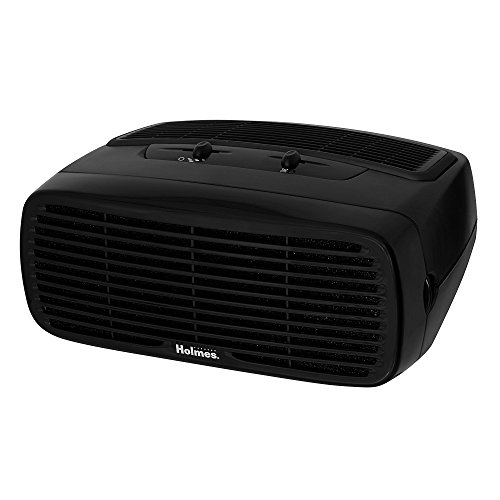
Why it made the list: Holmes’ desktop HEPA-type purifier is one of the few compact units with a declared CADR (70) and a stated room recommendation (up to 109 sq ft). That makes it a better fit than typical “breathing‑zone” devices when you want meaningful cleaning across a small room rather than only at your desk.
What the listing says (key facts): HEPA filter (captures particles down to ~2 microns per the manufacturer copy), recommended coverage 109 sq ft, 70 CADR, optional ionizer, three speed settings, 45 W wattage and a three‑year limited warranty.
Best for: small home offices, bedrooms or dens up to ~109 sq ft where a single compact unit should provide measurable air exchange in the entire room rather than only directly at the user’s face.
Limitations and notes: the product is described as a “HEPA-type” unit in the title and includes an optional ionizer; buyers who prefer no ionizer should choose settings that disable it or select a model that explicitly notes “No‑Ozone.” Holmes’ CADR helps compare performance, but if you need more than 109 sq ft of coverage, move up to a larger room purifier—see our general Best Air Purifiers hub (/best/air-purifiers/).
Read the HOLMES product page: HOLMES Desktop HEPA-Type Air Purifier.
Why it made the list: frestar combines a HEPA element with activated carbon and explicitly lists coverage up to 161 sq ft plus a quiet 30 dB operation—rare in compact models. For a small room where you need particulate reduction plus some odor control, that combination is useful.
What the listing says (key facts): HEPA + Activated Carbon filters; coverage 161 sq ft; noise 30 dB; USB powered; three-stage filtration; replacement HEPA filters available with a recommended change every 3–6 months; 5 W power draw.
Best for: small bedrooms, offices or kitchens where you want both particle removal and odor adsorption without a large footprint. The 161 sq ft coverage rating is the most explicit small-room metric among the portable USB-powered picks we reviewed.
Limitations and notes: the listing does not provide a CADR figure or filter replacement pricing. frestar is positioned as a small-room unit rather than a purely personal-breathing-zone device, and the 3‑6 month filter recommendation should be part of your running cost considerations.
Read the frestar product page: frestar Desktop Air Purifier.
Short list (portable carbon or washable-filter options): AuroraTurn Mini Rechargeable Desktop, Silanit Desktop Smoke Purifier Fan, ormos Rechargeable Desktop Air Purifier.
Why these appear here: for short-term smoke and odor problems—cooking fumes, cigarette smoke in a small space or hot-pot/barbecue smoke at a table—compact units with activated carbon pads and directed suction can reduce smell and grease near the source. The listed models include multiple reusable carbon pads or washable filters and features that help capture smoke at the point where it rises.
Key facts: Activated Carbon filter; listed price $27.99; includes 10 replaceable activated carbon filters that are reusable after drying; the manufacturer copy emphasizes portability for desktops, countertops and small rooms and calls the unit “Ultra‑Quiet,” but no dB value or CADR/coverage is supplied.
Best for: travelers, dorm rooms, or users on a tight budget who need a plug-in carbon pad purifier for odors and light smoke close to the source. The included replacement pads are a practical value.
Limitations: carbon pad-only units will not perform like HEPA-based purifiers for fine particles. No CADR or coverage specification is provided.
Product page: AuroraTurn Mini Desktop Air Purifier.
Key facts: Washable filter; current price $43.99; USB power options and a removable oil collection cup; adjustable tilt to aim suction at cooktops or smoking zones; listing highlights a quiet dual-speed motor but provides no dB figure or CADR.
Best for: home cooks who want a small extractor-style purifier for hot pot, frying or table-side smoke where the removable oil cup and adjustable tilt make cleaning and targeted capture easier than with a strictly stationary desktop blower.
Limitations: not a substitute for a full kitchen hood; intended for localized capture. No formal coverage or CADR numbers were supplied.
Product page: Silanit Desktop Smoke Purifier Fan.
Key facts: Washable filter; current price $19.99; the listing describes a dual-channel suction design, adjustable tilt, a washable filter plus removable oil cup, and claims “library-quiet 36 dB” operation; USB rechargeable/USB powered functionality is emphasized.
Best for: people who need a portable, rechargeable smoke trap and prefer reusable washable filters to replaceable pads. The lower price point and compact form make it easy to carry between kitchen, desk and travel locations.
Limitations: as with other carbon/washable-filter options, particle removal performance for fine particulates is limited compared with H13 HEPA devices. The listing does not give a CADR or a square-foot coverage.
Product page: ormos Rechargeable Desktop Air Purifier.
| Model | Filter type | CADR | Coverage (sq ft) | Noise (dB) | Yearly filter $ | Price (current) |
|---|---|---|---|---|---|---|
| QUEENTY Desktop Air Purifier | H13 HEPA | Not specified | Not specified | 25 dB (sleep mode) | Not specified | $30.39 |
| HOLMES Desktop HEPA-Type | HEPA | 70 | 109 | Not specified | Not specified | $54.28 (current) |
| frestar Desktop Air Purifier | HEPA + Activated Carbon | Not specified | 161 | 30 dB | Not specified | $19.99 |
| AuroraTurn Mini | Activated Carbon | Not specified | Not specified | Not specified | Not specified (includes 10 carbon filters) | $27.99 |
| Silanit Smoke Purifier Fan | Washable Filter | Not specified | Not specified | Not specified | Not specified (washable) | $43.99 |
| ormos Rechargeable Desktop | Washable Filter | Not specified | Not specified | 36 dB (manufacturer copy) | Not specified (washable) | $19.99 |
Notes on the table: CADR and yearly filter cost are not supplied for most compact desktop models; where a metric was not provided by the manufacturer listing we show “Not specified.” Use the listed filter type, manufacturer noise figure and coverage guidance together to estimate real-world fit.
Desktop purifiers tend to trade raw airflow for compact size and quiet operation. Here are the practical checks to make before you buy and what each spec means in everyday use.
H13 HEPA (as specified for QUEENTY) is a higher-grade True HEPA rating and indicates stronger capture of very small particles compared with generic “HEPA‑type” or purely mechanical washable filters. HEPA plus activated carbon (frestar) gives particle capture and some odor adsorption in the same unit. Activated carbon and carbon pads are effective at reducing lighter odors and volatile organic compounds (VOCs) at the breathing zone but generally do not capture the finest particulates as reliably as H13 HEPA.
CADR (Clean Air Delivery Rate) is the most standardized way to compare how quickly a purifier can clean air. Among the supplied models only HOLMES lists a CADR (70), which helps it stand out as a small-room performer. Many desktop units omit CADR because they’re optimized for a single breathing zone rather than whole-room exchange—if you want to clean a room rather than your desk, prefer a model with both a CADR and a square‑foot coverage recommendation (frestar and HOLMES provide coverage figures).
Noise matters on a desk or at night. QUEENTY lists a 25 dB sleep mode and frestar 30 dB; these numbers indicate quiet operation suitable for sleep or focused work. Other models use qualitative terms (“ultra‑quiet,” “library‑quiet”) or list 36 dB for ormos; when a dB number is missing, expect the actual noise to vary by fan speed. If noise is a priority, choose the lowest dB figure available or look to our Quietest Air Purifiers hub (/best/quiet-air-purifiers/).
USB-powered units (QUEENTY, frestar) are flexible for desks and travel power banks; rechargeable models (ormos, some Silanit variants) add true portability for short durations. Verify whether the unit needs an adapter or includes USB charging. Plug-in units that require a wall outlet (AuroraTurn per its product copy) may be simpler day-to-day but less portable.
Running cost is often overlooked. frestar recommends filter replacement every 3–6 months; QUEENTY notes replacement filters are available but does not list a price; AuroraTurn ships with 10 carbon pads and calls them reusable after drying; Silanit and ormos emphasize washable filters and removable oil cups. If you prefer low recurring costs, favor washable-filter units or models that include multiple replacement pads—just be aware washable filters can lose efficiency over many cycles.
Some compact models include ionizers (QUEENTY notes an ionizer but explicitly states “100% No‑Ozone” in the listing; HOLMES offers an optional ionizer). Others (like the separate Manfh listing in the supplied data) are ozone generators—these are not recommended for occupied spaces and are excluded from our recommended picks. If you prefer to avoid any risk, choose a unit that explicitly states it does not produce ozone.
Desktop units are attractive because many offer washable elements or cheap replaceable pads, but you’ll still need to plan for upkeep:
Small changes to placement and operation make a large difference with desktop purifiers:
Ozone generators and large ozone-producing machines are not recommended for occupied spaces. The supplied Manfh listing describes an ozone generator claiming coverage up to 6,000 sq ft and strong odor removal via ozone; the product copy also notes the machine must be used in an enclosed space with people and animals removed during operation. We exclude such devices from our recommended picks because they are designed for unoccupied treatment and require strict safety protocols—desktop purifiers intended for everyday occupied use should not rely on ozone.
Separately, be cautious about carbon-pad-only devices if your priority is fine particulate removal (PM2.5, allergens). Carbon pads are useful for odors but offer limited particulate filtration compared with True HEPA filters.
Use this short decision flow to match the models above to your situation:
A desktop unit with a True HEPA element (such as a specified H13) will capture many airborne allergens when you sit within a few feet of it. For whole-room allergy control, combine a desktop unit with a larger, properly sized room purifier—see our Best Air Purifiers guides for full-room recommendations (/best/air-purifiers/).
Noise varies by fan speed and design. QUEENTY lists a 25 dB sleep mode; frestar lists 30 dB; ormos advertises ~36 dB. Models without dB ratings may be audible at higher fan settings. If you are noise‑sensitive, prioritize units with explicit low-dB sleep modes.
Yes—USB-powered and rechargeable models are convenient for travel and RV use. frestar and QUEENTY are USB powered, ormos and some Silanit units advertise rechargeable or USB operation. Confirm battery runtime for rechargeable models if you plan extended unplugged use (battery runtime is not provided in the supplied data).
Recommended intervals depend on filter type and usage. frestar recommends 3–6 months for its HEPA filter; washable filters (Silanit, ormos) can be cleaned and reused but eventually degrade. QUEENTY notes replacement filters are available but does not list an interval—check the vendor for recommended replacement timing based on your indoor pollutant load.
Some desktop purifiers include an ionizer option to agglomerate particles so they are easier to capture. QUEENTY includes an ionizer and explicitly states the unit is “No‑Ozone”; HOLMES offers an optional ionizer. If you want to avoid ionization or any risk of ozone, choose units that explicitly say they produce no ozone or keep the ionizer turned off where possible.
Compact purifiers are optimized for close-range air improvement and small rooms. They are not a replacement for a properly sized whole-room purifier when you need to cycle all the air in a living room or open-plan area. They also will not treat waterborne contaminants, remove deep-seated odors permanently from fabrics or walls without repeated treatment, or substitute for medically prescribed environmental controls. For broader or clinical needs, consult our in-depth reviews and buying guides (/reviews/, /faq/).
If you want the most reliable per-person protection at a desk or bedside, a compact True HEPA device with a low-noise sleep mode is the best starting point—QUEENTY fits that profile in the supplied product set. If you need small-room coverage rather than only a breathing-zone effect, HOLMES or frestar are the clearer choices because they list coverage metrics
In this roundup, "H13 True HEPA" is presented as having much higher particulate capture potential for allergens and fine dust. "HEPA-type" (as with the Holmes unit) is a lower-specificity label; the Holmes listing cites particle capture down to ~2 microns per the manufacturer. Verify the manufacturer’s stated HEPA class or particle-size capture and look for an H13 label if you want higher-rated particulate removal.
Safety was a selection criterion here: units that explicitly state "No‑Ozone" are preferred and ozone generators were excluded. QUEENTY lists a built-in ionizer but also explicitly claims "100% No‑Ozone." Holmes offers an optional ionizer; buyers who prefer no ionizer should disable it or pick a model explicitly labelled "No‑Ozone." If unsure, confirm the listing’s ozone statement before buying.
Breathing‑zone devices (like QUEENTY) are designed to clean air within about 1–3 feet of the user using face‑to‑face airflow and are compact/quiet for desk or bedside use. Small‑room desktop purifiers (like Holmes or frestar) provide declared room coverage or CADR so they can clean an entire small room. Choose based on whether you need targeted near‑field protection or measurable whole‑room exchange for a small space.
The supplied listings vary: QUEENTY notes ease of filter replacement but doesn’t list filter cost; frestar mentions replacement HEPA filters with a recommended change interval but the supplied copy is incomplete. You should verify the recommended replacement interval, filter part numbers, and replacement cost on each product page before purchasing.
Noise is key for bedside use. The guide highlights sleep modes and ≤30 dB operation: QUEENTY has a 25 dB sleep mode, frestar lists 30 dB, and quiet operation is noted as an advantage. When considering a bedside unit, confirm the manufacturer’s sleep‑mode noise figure and whether the unit has a low‑noise or sleep setting.
Power source affects where you can place a unit: USB power and rechargeable options increase portability. QUEENTY and frestar are USB‑powered per their listings; Holmes lists 45 W wattage (and is a plug model). Verify the product’s stated power source (USB, plug, or rechargeable) and whether you need a portable or plug‑in solution for your desk or travel use.
Answers are educational and may link to relevant guides or products on this site. Product facts can change, so confirm current details before purchase.
